




Creative Operations for Teams That Don't Have a Creative Department
Forty requests a month land on a marketing team of three, and almost none of them arrive looking like requests. One is a message with a screenshot attached and the words can we do something like this. One is a forwarded thread from sales asking for the deck, but for healthcare. One is a calendar invite titled Website Refresh, no agenda, four attendees. And on Thursday somebody rebuilds a one-pager that already existed, approved, in a folder, from March.
Creative operations is the discipline meant to solve exactly that. The difficulty is that nearly everything published about it was written for somebody else.
Search the term and the first page is a wall of enterprise guides - Adobe, Atlassian, Extensis, Brandfolder, Smartsheet, and a newer crop of workflow startups - each running about two thousand words, each ending at a demo booking. They describe resource allocation across dozens of creatives, digital asset libraries, capacity forecasting, tiered intake portals. They assume a creative department. Below them sit job listings for a Creative Operations Manager, and, dependably, a regional theatre company.
The team that needs this most is not in the results at all.
What creative operations means when the creative team is one designer, or nobody
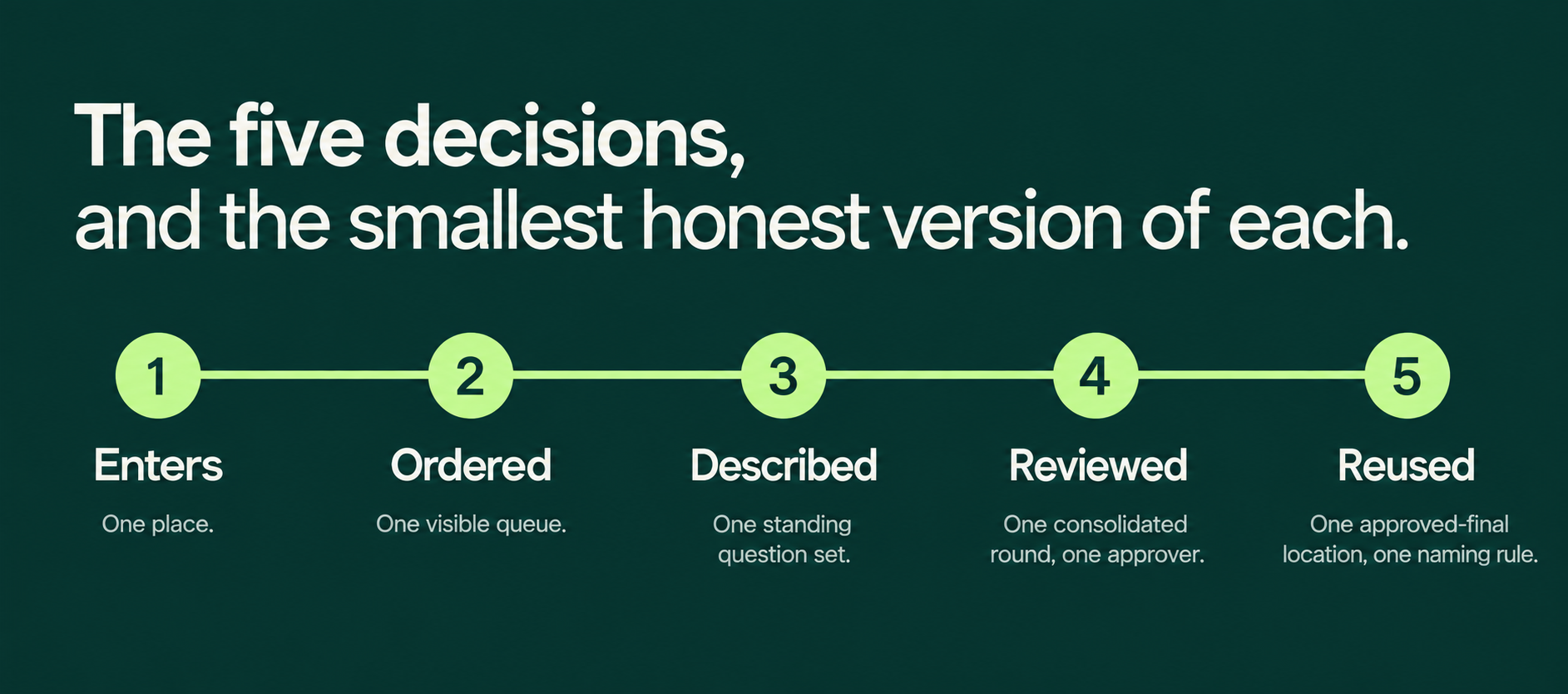
Take the software out and the discipline gets much smaller. Creative operations is the set of decisions a team makes about how creative work enters, gets ordered, gets described, gets reviewed, and gets reused. That is the whole of it. Every platform on that results page is an expensive mechanism for enforcing five decisions that somebody, somewhere, already made by hand.
Which means your team already has creative operations. Nobody chose it, is all. Work enters through whichever channel the requester happened to be standing in. It gets ordered by whoever asked most recently, or most insistently. It gets described in one sentence and a screenshot. It gets reviewed by whoever is in the thread that afternoon. It gets reused almost never, because no one can find the file.
That is still a creative workflow. It is the default version, and the default version is the most expensive one available.
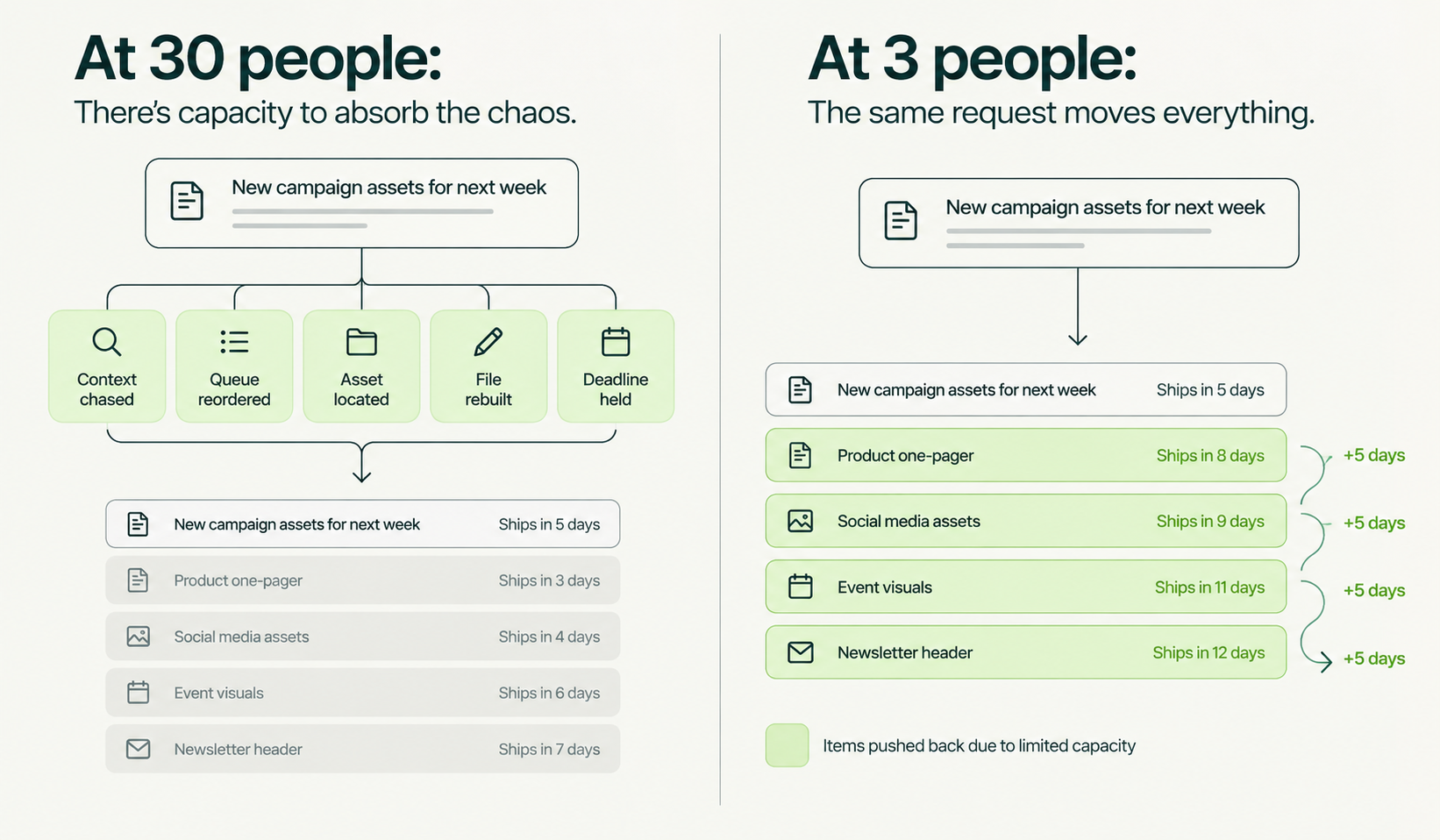
The part that gets missed: small teams need this more than large ones, not less. A thirty-person creative department has slack in it. When a request arrives half-formed, somebody absorbs the ambiguity - a producer chases the missing logo, a traffic manager reshuffles the queue, a junior designer quietly rebuilds the file. Wasteful, but padded. A team of three has no padding. One unclear request does not cost you one delayed asset. It costs the afternoon of the only person who could have shipped the four things queued behind it.
A bad request does not only delay one asset. It disrupts the capacity behind every request waiting after it.
The practitioners who write about creative operations management understand this perfectly well; they just tend not to say it out loud. Ziflow's own guidance on team structure notes that in smaller organizations the function collapses into a single manager, or an individual contributor with a knack for big-picture organizing, and that in small agencies the founder simply keeps it. That is worth reading as an admission: creative ops is a job title only when volume justifies one. It is a set of decisions always.
The five decisions, and the smallest honest version of each
What follows is not a maturity model. Each of these has a version that fits on one page and can be installed by one person who is already busy.
1. Intake - how work enters
The minimum viable version is one place. Not a well-designed place, not the place a consultant would pick. One. The value is not in the form fields; it is in the fact that a request that did not go through the front door does not exist yet. That single sentence is most of the benefit, and it is free.
The failure mode is not people ignoring the form. It is the person receiving requests accepting them anywhere out of politeness, which teaches everyone that the form is optional.
2. Prioritization - how work gets ordered
The minimum viable version is a visible queue with a top five, where only one named person changes the order. Visible matters more than sophisticated. Most priority arguments on small teams are not disagreements about importance; they are two people with different mental pictures of what else is in flight.
Skip effort scoring, weighted matrices and tiering for now. A list, in order, that everyone can see, changed by one person.
3. Briefing - how work gets described
The minimum viable version is a short standing set of questions, resolved in conversation, not an eleven-field form anybody has to complete alone. What are we making, what does it need to accomplish, what must be included, which existing assets should it use, what is fixed and what is open, what should it avoid, when is review and when is it live, who approves, where does feedback go, what happens after approval.
Treat that as a shared checklist rather than a gate. A request does not need to arrive perfect. It needs a process that makes it ready.
4. Review - how work gets judged
The minimum viable version is one consolidated round of feedback and one named final approver, identified before production starts rather than discovered afterwards. Consolidated is the operative word: three people leaving separate comments in three places is not three times the feedback, it is a contradiction the designer has to resolve without the authority to resolve it.
Naming the approver early is the single cheapest change on this list, and the one teams postpone longest, because naming them feels political. It costs one awkward sentence in week one and saves an entire round later.
5. Reuse - how work comes back
The minimum viable version is one location for approved finals and a naming rule dull enough that nobody has to think about it. Date, channel, short description. The test is whether someone who was not involved can find the current approved version in under a minute without asking.
This is the decision small teams skip most often and pay for most quietly, in assets rebuilt from scratch because the editable file went missing, or because the only copy of the right font is inside a flattened image.
A week-one setup: one form, one board, one recurring half hour
Here is the version that fits in a working week, alongside the job you already have.
1. Monday. Create one intake form. Six questions at most, drawn from the briefing set above. Put the link in your email signature, in the team channel description, and in the calendar invite for every recurring meeting where requests tend to get spoken aloud.
2. Tuesday. Make one board with four columns - requested, ready, in production, approved. Move every live piece of work onto it, including the three things that exist only in somebody's head. Expect this to be the uncomfortable day; the board is usually longer than anyone guessed.
3. Wednesday. Write the two rules down where the work lives: one owner per request, one consolidated round of feedback. Two sentences. Not a policy document.
4. Thursday. Name the approver for every item currently in production. Where there are two, pick one and tell both.
5. Friday. Book a recurring thirty-minute triage. Same slot weekly. This is the only new meeting, and it replaces roughly four unscheduled interruptions.
That is the entire installation. No procurement, no migration, no tool evaluation, no change-management plan. The reason it works is not that a form is clever. It is that five decisions stop being made forty separate times a month by whoever is nearest.
Worth saying plainly: the spreadsheet-and-shared-doc version of this is genuinely fine at low volume. Marketing workflow management software earns its cost when the number of live requests exceeds what one person can hold in their head, and not reliably before. Teams routinely buy the platform first and wonder why the chaos moved rather than left.
What the weekly triage actually sounds like
Thirty minutes, one screen, the board open. The queue gets read top to bottom out loud. Three questions get asked of each item: is this still needed, is it ready to start, and who signs it off. Most of the value comes from the first question, which nobody asks in writing.
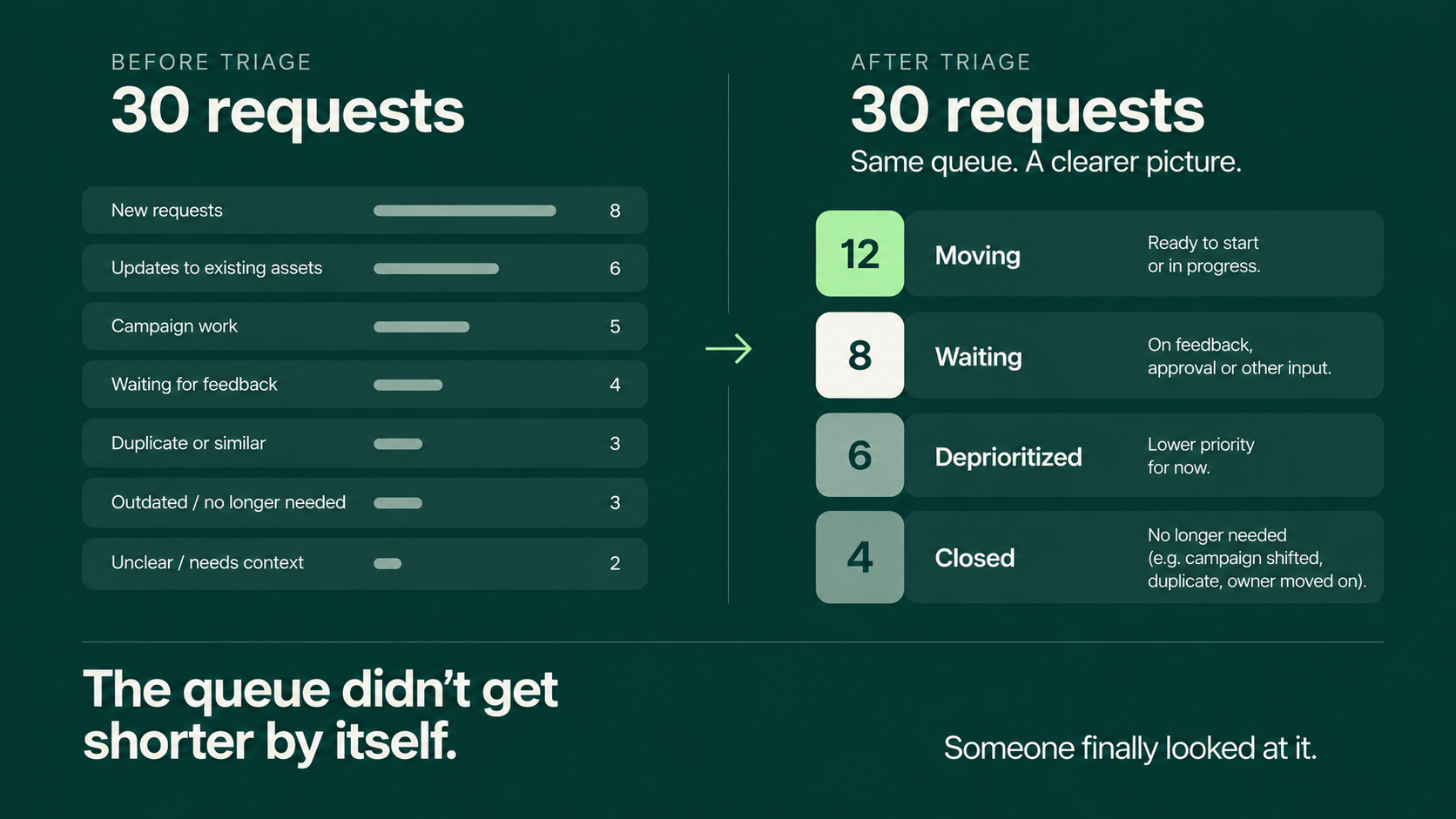
Things get cut in triage. That is the function, not a side effect. On a queue of thirty items, some meaningful fraction are requests whose campaign shifted, whose event passed, whose owner left, or which duplicate something already approved and unfound. They were never cancelled because cancelling requires somebody to notice, and noticing requires reading the list aloud once a week.
At Bespire, the weekly queue does more than tell us what’s next. It shows us what’s actually happening. Some requests are ready to move. Some need context. Some are waiting on feedback. And some no longer need to exist.
Once those are separated, the queue becomes a much more useful conversation: what can we take on, what needs to wait, and where is capacity actually going?
The second thing triage produces is an honest read on capacity. A queue that gets longer every week is not a motivation problem or a talent problem. It is arithmetic, and it is far easier to take to a leadership conversation as a visible list than as a feeling of being behind.
Signs you have outgrown the one-page version
The one-page setup has a ceiling, and it is useful to know what hitting it looks like rather than discovering it in a bad quarter.
• The board has more live items than the weekly triage can read aloud in thirty minutes.
• Two or more people now spend a meaningful part of their week coordinating creative work rather than doing it, and neither was hired for that.
• You are reconstructing decision history - why a direction was rejected in July - from scattered threads, more than once a month.
• Requests routinely arrive from people you do not work with directly, so the shared context the form relies on no longer exists.
• The same asset is being adapted into more than four or five formats, and the resizes alone consume a designer's week.
• You have started quietly declining work that the business genuinely needs, without that appearing anywhere as a decision.
The last one is the serious signal. A queue that silently sheds work is worse than a visibly overloaded one, because it looks like the system is coping.
None of these mean buy software. They mean the five decisions now need somebody whose actual job is to make them - whether that is a hire, a reallocation of an existing person, or an external layer that takes the function on.
Where a managed partner takes this over
The honest framing of what a creative subscription sells is not design hours. It is this function, rented.
At Bespire the five decisions belong to a Success Manager. They are the person who clarifies what a request actually needs before it reaches production - the missing dimensions, the unconfirmed copy, the asset that exists but was never linked, the deadline that turns out to mean review rather than publication. They research the topic when it needs research, refine copy, confirm formats, organize priorities, coordinate the creative team, review the first version, consolidate feedback into something a designer can act on, and carry the request through revision to approval. That is judgment work, and it is where most of the value sits.
The platform does the other half. One request keeps the original instructions, the request-level chat, the brand assets and references, every uploaded file, each design version, the feedback, the status and the final approval attached to the same place. Not because centralizing is virtuous in the abstract, but because of what it removes: repeated questions, uncertainty about which file is current, feedback that arrives in three channels, a stakeholder appearing after approval with no visibility of what was already decided.
Those two halves do different work and neither substitutes for the other. The Success Manager makes the request ready. The platform keeps the request organized. Software on its own does not clarify an unclear request - it stores an unclear request more tidily, which is a smaller benefit than most vendors imply, including on that first page of search results.
This is not the right answer for everyone. Teams with a strong internal creative lead and steady, predictable volume are usually better served building the function in-house and keeping it. Teams whose work is deeply embedded in product design, or requires sitting inside daily engineering rhythm, will want that capability close. The case for renting it is strongest when creative demand is real but uneven, when nobody currently owns the five decisions, and when the alternative being considered is a first design hire who would spend half their time coordinating rather than designing.
Against that last comparison, installing the one-page version yourself is frequently the better first move - and it costs a week.
The point of all of it
Marketing budgets have not moved. Gartner's 2026 CMO Spend Survey puts them at 7.8% of company revenue, against 7.7% the year before, and roughly 18% below where they sat four years ago - measured, it is worth noting, on organizations mostly above a billion dollars in revenue. HubSpot's 2026 State of Marketing, covering more than 1,500 marketers, found 83.5% now expected to produce more content, with under 5% reporting any decrease in workload. Superside, a vendor with an obvious interest in the answer, reports 78% of enterprise creative leaders saying demand already outstrips capacity.
Every one of those numbers was measured on teams substantially larger than the one this article is written for. The gap they describe is not new and it is not closing, and for a team of three it does not get solved by another set of hands.
Creative operations is not a department you cannot afford. It is five decisions you are already making badly, for free.
Frequently asked questions
What does creative operations actually mean?
Creative operations is the set of decisions governing how creative work enters a team, gets ordered, gets described, gets reviewed and gets reused. In large organizations those decisions are held by a dedicated creative ops function with supporting software. In small ones they are made informally dozens of times a month. The decisions exist either way; creative operations just means making them deliberately.
What department does creative operations fall under?
Most often marketing, sometimes a standalone creative services or in-house agency team, occasionally operations. On teams under about ten people it is not a department at all - it usually lands with the marketing manager or whoever is most naturally organized, as part of a wider role. Where it reports matters far less than whether one named person owns the queue.
Do you need creative operations software to get started?
No. A form, a shared board and a recurring thirty-minute triage cover the essentials, and most teams under five marketers get further with that than with a platform. Creative workflow management tools earn their cost once the number of live requests exceeds what one person can hold in their head, and once losing version history starts costing real rounds of work. Buying earlier tends to relocate the disorder rather than remove it.
What is the difference between creative operations and project management?
Project management moves one piece of work from start to finish. Creative operations sets the rules that apply across all of them - how requests enter, how priority is decided, what counts as ready, who approves, where finished work lives. A team can be good at running individual projects while having no creative operations at all, which typically shows up as competent delivery of the wrong things in the wrong order.
Can one person run creative operations part-time?
Yes, and on small teams that is the normal arrangement. The realistic commitment is the weekly triage plus keeping the queue honest between sessions - under an hour a week at low volume. It stops being viable when coordinating the work starts crowding out doing the work, which is the clearest signal that the function needs either a dedicated owner or an external layer.
How do I know if our creative workflow is actually broken?
Three symptoms are diagnostic: assets being rebuilt because the original could not be found, feedback arriving through several channels for the same piece, and work reaching production before anyone confirmed who signs it off. Any one of those on repeat means the problem is the process, not the pace of the people in it.
Start with the week, not the tool
If you take one thing from this: block the Friday half hour, and write down the two rules. Most of the gain in this article comes from those two moves, and neither requires permission or budget. We have put the one-page creative ops setup - the intake questions, the board columns, the two rules and the triage agenda - together as a download, and it is genuinely designed to be used without us.
If the queue is already past the point where one person can hold it, that is the conversation worth having. Bespire gives teams one place where requests, conversation, files, versions, feedback, revisions and approvals stay connected, with a Success Manager doing the clarifying work that keeps the creative team productive. See how the Bespire workflow runs, and judge it against the honest alternative - which, for plenty of teams, is the one-page version above.